
Get Gacha Life on iPhone and iPad
Free from the App Store. Runs on iPhone, iPad, and newer Mac and Vision Pro devices.
Get Gacha Life on the App Store
How Gacha Life Works on iOS
iOS uses one install route: the App Store. Unlike Android, iOS does not allow APK installs for regular users. The button on this page opens the official Lunime App Store listing.
No APK file. No emulator. No jailbreak. You tap Get, iOS handles the install. The game is free. In-app purchases are optional and unlock cosmetic items only.
Every mode is included on iOS. Character design, Studio Mode, Life Mode, and all eight mini-games. It is the same game from the same developer as the Android version (Lunime Inc.).
Gacha Life or Gacha Life 2
Lunime has two current games on the App Store. Here is the honest comparison.
Gacha Life (2018)
The one most people mean when they search for “gacha life iOS.” Twenty character slots. Studio Mode, Life Mode, and mini-games. Lunime has not shipped a major update since December 2018. On iOS 17 and iOS 18, some players report freezing and crashes on this build. It still works, but is sensitive to memory pressure.
Gacha Life 2 (2023)
The sequel. Three hundred character slots. Bigger Studio Mode (up to 16 characters per scene). New Gacha Simulator with 400 collectible characters. No Life Mode in the classic form. Runs cleanly on modern iPhones.
Most searchers landing on this page want the original Gacha Life. Install that first. If you also want the newer features, add Gacha Life 2 later. Both are free. Characters do not transfer between them.
Device Requirements
Gacha Life (original)
- iPhone or iPad on a modern iOS version
- Runs on older iPhones other new apps have dropped
- At least 200 MB free storage
- Play offline once installed
Gacha Life 2
- iPhone or iPad running iOS 16.1 or later
- Apple Silicon Mac (M1+) with macOS 13 or later
- Apple Vision Pro with visionOS 1.0 or later
- Around 300 MB free storage
- Play offline once installed
If your iPhone cannot update past iOS 15, stick with the original Gacha Life. Gacha Life 2 requires iOS 16.1.
How to Install Gacha Life on iPhone or iPad
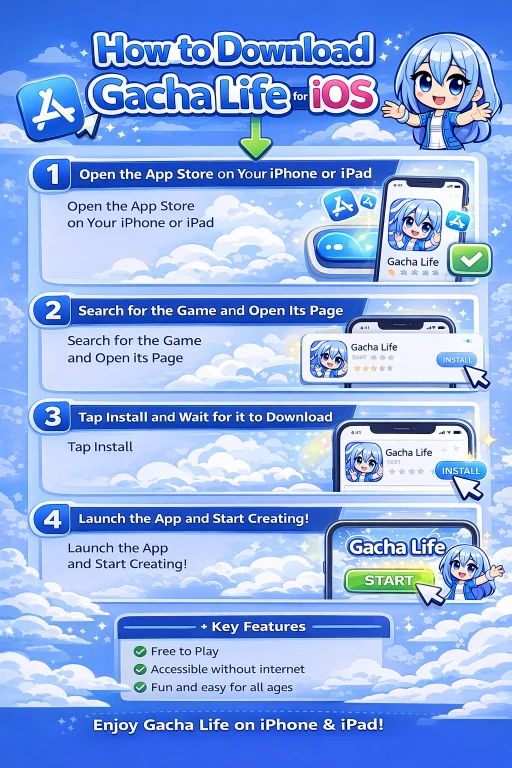
- Tap the App Store button at the top of this page. Your browser opens the App Store app on the Lunime Inc. listing.
- Tap Get. If you have installed Gacha Life before, this button says Redownload instead (cloud icon). Same result.
- iOS asks for Face ID, Touch ID, or your Apple ID password. Confirm.
- Wait 20 to 60 seconds for the download. Connect to Wi-Fi if the download stalls on cellular.
- Tap Open. On first launch the game creates local save files. Give it a few seconds.
You do not need a Google account. You do not need an emulator. You need an Apple ID.
If Gacha Life does not appear in your App Store, change your App Store region to United States in Settings > [your name] > Media & Purchases > Country/Region. This resets your purchase history and requires a payment method that matches the new region.
Fixing the iOS Freezing and Crash Problem
The original Gacha Life has not been updated since December 2018. On newer iOS versions, that gap shows up as freezes on Studio Mode load and occasional crashes during scene save. These are practical fixes that help.
Force quit and reopen. Swipe up from the home bar. Swipe Gacha Life off the app switcher. Reopen. Clears the memory state that causes most freezes.
Close background apps before you play. Especially before long Studio Mode sessions. Every open app in the switcher shares memory with Gacha Life.
Turn off Low Power Mode. In Settings > Battery. Low Power Mode limits background CPU and can make older apps stutter more.
Restart your iPhone before big sessions. A restart clears more system memory than closing apps.
Move to Gacha Life 2 for heavy Studio Mode work. It runs cleaner on iOS 16 and later. If you keep losing progress in the original because of crashes, this is the practical fix.
How to Back Up Your Characters on iOS
Gacha Life has no cloud save. Characters live on your iPhone locally. If you delete the app or replace your phone, they are gone.
The realistic backup method for most players is simple: screenshot each character in the editor. Create a Photos album called Gacha Life Backup. Save every character screenshot there. Turn on iCloud Photos in Settings > [your name] > iCloud > Photos. Your screenshots then sync to iCloud automatically.
For a full local backup, plug your iPhone into a Mac or PC and back up the whole device through Finder or iTunes. This includes app data. Slower to set up and more complete when restoring.
Gacha Life 2 also stores characters locally. Same backup approach works.
Gacha Life Is Safe for Kids on iOS
The App Store rates Gacha Life for ages 9 and up. No blood, no explicit content, no real-money gambling. Live chat was removed years ago. The only in-game text comes from scripted NPC dialogue.
To lock down the safe setup on a child’s device:
Block in-app purchases
Settings > Screen Time > Content and Privacy Restrictions > iTunes and App Store Purchases > In-app Purchases > Don’t Allow.
Set up Family Sharing
Purchase approvals go to a parent’s device. Turn on Ask to Buy in Family settings.
Cap daily play time
Settings > Screen Time > App Limits. Studio Mode sessions can run long. A 60-minute daily cap works for most families.
The bigger safety concern is not the app. It is YouTube and TikTok Gacha content, some of which is made for adult audiences. Use YouTube Kids or Screen Time content restrictions to filter that separately.
Updating and Uninstalling
Updates come through the App Store. If Automatic Downloads is on (Settings > App Store), they install in the background. To check manually, open the App Store, tap your profile picture, and scroll to the Updates section. The original Gacha Life rarely gets updates now. Gacha Life 2 updates more often.
To uninstall: long-press the Gacha Life icon on your home screen. Tap Remove App, then Delete App. This removes the app and all local save data. Screenshot your characters first if you plan to reinstall later.
Frequently Asked Questions
Is there a Gacha Life APK for iOS?
No. iOS does not use APK files. That is an Android format. On iPhone and iPad, install Gacha Life directly from the App Store using the button at the top of this page.
Why is Gacha Life crashing on my iPhone?
The original Gacha Life has not been updated since December 2018. Modern iOS versions handle old apps poorly. Close background apps, turn off Low Power Mode, and restart your iPhone before long sessions. If crashes continue, install Gacha Life 2.
Is Gacha Life free on iOS?
Yes. Every mode is free. In-app purchases only unlock cosmetic items.
Can I play Gacha Life offline on iOS?
Yes, once installed. After the App Store download completes, Gacha Life runs fully offline. Wi-Fi and mobile data are not required to play.
Is Gacha Life safe for kids on iOS?
Yes, with basic setup. Restrict in-app purchases in Screen Time, use Family Sharing with Ask to Buy, and cap daily screen time. The game itself has no live chat, no explicit content, and no gambling.
How do I update Gacha Life on iOS?
Open the App Store, tap your profile picture, and check for updates. Or turn on Automatic Downloads in Settings > App Store to get updates automatically.
Which is better, Gacha Life or Gacha Life 2 on iOS?
Gacha Life 2 has more features, more character slots, and runs better on new iPhones. The original Gacha Life still has Life Mode, which Gacha Life 2 does not include in the same form. Try the original first, then add Gacha Life 2 if you want the newer Studio Mode.
Can I run Gacha Life on iPad?
Yes. Both games run on iPad. The larger screen makes Studio Mode much easier to use.
Can I run Gacha Life on Mac?
Only Gacha Life 2. It runs on Apple Silicon Macs (M1 or newer) with macOS 13 or later. The original Gacha Life does not have a Mac version.
Does Gacha Life have a cloud save on iOS?
No. Characters are stored locally on your device. iCloud does not back them up automatically. Screenshot each character and save the screenshots to iCloud Photos as your backup.
Can I move my characters from Android to iPhone?
Not directly. There is no cloud save. Screenshot your characters on Android, sync the screenshots to iCloud or Google Photos, then rebuild each character on iOS.
Is Gacha Life on Apple Vision Pro?
Gacha Life 2 supports Vision Pro with visionOS 1.0 or later. The original Gacha Life does not have a Vision Pro build.
Why can I not find Gacha Life in my country’s App Store?
Some regions do not list every Lunime title. Change your App Store region to United States in Settings > [your name] > Media & Purchases. This resets your purchase history and requires a matching payment method.
Do I need an Apple ID to install Gacha Life?
Yes. The App Store requires an Apple ID for every install, even free ones.