
Download Gacha Life for PC (Windows and Mac)
Free download. Full game. Works on Windows 10, 11, and Apple Silicon Macs.
Get Gacha Life on PC
Gacha Life for PC: What You Get
Download the file from the button above and follow the setup steps below. You get the full Gacha Life experience on a desktop or laptop. Every mode included: character design, Studio Mode, Life Mode, and all eight mini-games. Runs on Windows 10, Windows 11, and Apple Silicon Macs (M1, M2, M3, M4).
The download on this page is the standard Gacha Life build. It runs on your computer through a lightweight Android environment called BlueStacks. This is the same route most Gacha creators use on PC. Setup takes about 10 to 15 minutes the first time. After that, launching the game is a single click.
PC and Mac Requirements
For Windows
- Windows 10 or Windows 11 (64-bit)
- Intel Core i3, AMD Ryzen 3, or newer
- 4 GB RAM minimum, 8 GB recommended
- 5 GB free disk space
- Updated graphics drivers
- Virtualization on in BIOS (Intel VT-x or AMD-V)
For Mac
- macOS 11 (Big Sur) or higher
- Apple Silicon Mac (M1, M2, M3, or M4)
- 8 GB RAM
- 5 GB free disk space
Intel Macs are no longer supported by the current BlueStacks build. If you own an Intel Mac, we recommend using a Windows partition through Boot Camp and following the Windows steps.
How to Install Gacha Life on PC
Follow every step. This works for Windows and Apple Silicon Macs.
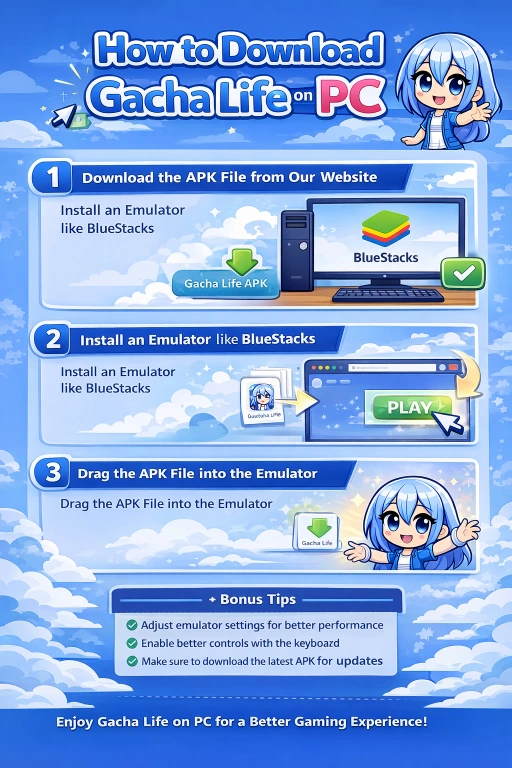
- Click the download button at the top of this page. Save the file to your Desktop or Downloads folder.
- Go to bluestacks.com and download the free installer for your system. Windows users get an .exe file. Mac users get a .dmg file.
- Run the installer. Setup takes 3 to 5 minutes and needs an internet connection.
- Open BlueStacks. On first launch it downloads the required Android files. Wait a few more minutes.
- When the BlueStacks home screen appears, drag the Gacha Life file you downloaded from us directly onto the window. You can also use the Install APK button in the sidebar.
- Wait about 30 seconds for the install. The Gacha Life icon appears on the BlueStacks home screen.
- Click the icon to launch. First launch takes 15 to 20 seconds. Later launches are quick.
You do not need a Google account. You do not need to sign in. The game runs fully offline once installed.
Set Up Keyboard Controls
Your mouse works as a virtual finger by default. That is enough for most players. For faster editing in Studio Mode, open the Keymapping tool in BlueStacks (keyboard icon at the top right). Bind keys to the character add button and the save scene button. Most creators map these to F1 and F2. You are done in under a minute.
Why Playing on PC Beats Mobile
Concrete gains, not just “feels better.”
- Studio Mode toolbars fit on screen. No pinch-zoom. No cut-off menus.
- Mouse precision beats thumb tapping when placing small props or adjusting eye position.
- No battery drain during long editing sessions.
- Screen recording is easier. Use OBS Studio on Windows or QuickTime on Mac.
- Saved scene files stay on your computer, so you can back them up like any other file.
The tradeoff is that BlueStacks uses noticeable RAM. Below 8 GB total on your machine, expect some stutter. 8 GB or more runs Gacha Life smoothly.

Common PC Problems and Fixes
BlueStacks says virtualization is disabled. Restart into BIOS or UEFI. Look for Intel VT-x, AMD-V, or SVM Mode. Turn it on. Save and reboot. The emulator will start.
Gacha Life crashes when opening a scene. Open BlueStacks Settings. Increase the RAM allocation. If your PC has 8 GB, set BlueStacks to 4 GB. If you have 16 GB, set it to 6 GB. Restart the emulator.
Screen looks stretched or blurry. Open BlueStacks Settings and change the display resolution. Try 1600×900 or 1920×1080 depending on your monitor.
Game runs but no sound. Check that the audio output in BlueStacks matches your computer’s default output device.
File will not install inside BlueStacks. The download was likely cut off. The file should be around 108 MB. Delete it and download again from the button at the top of this page.
Emulator slows my PC down after I close the game. BlueStacks keeps running in the background. Right-click the taskbar icon and choose Quit to fully close it.
How to Update Gacha Life on PC
You will not get automatic updates because you did not install through the Play Store. Manual updates are easy.
- Come back to this page every few months.
- Check the version number under the download button.
- If the number here is higher than yours, download the new file from us.
- Drag it into BlueStacks. Install on top of the old build. Your characters and saved scenes stay intact.
You do not need to uninstall the old version first.
Recording Your Gacha Life Scenes on PC
This is the top reason creators move from mobile to desktop. Recording is far easier here.
Windows
OBS Studio is free and gives you full control. For quick captures, press Win + G to open the built-in Xbox Game Bar.
Mac
Press Cmd + Shift + 5 to open the built-in screen recorder. It exports straight to .mov, ready for CapCut, Final Cut, or DaVinci Resolve.
Most creators still export scenes as individual images from Studio Mode, then assemble the video in an editor. This gives cleaner transitions than live screen recording.
Frequently Asked Questions
Is the Gacha Life PC download safe?
Yes. The file on this page is the standard build. BlueStacks is a widely used emulator from a US company. Both are safe to download from the sources linked here.
Is Gacha Life free on PC?
Yes. The game and the emulator are both free. In-app purchases inside the game are optional and only unlock cosmetic items.
Which emulator works best?
BlueStacks is the easiest for first-time users on Windows and Apple Silicon Macs. LDPlayer is a lighter option if your Windows PC has less than 8 GB of RAM.
Can I play Gacha Life on Intel Mac?
The current BlueStacks build does not support Intel Macs. Your options are running Windows through Boot Camp and using the Windows setup, or trying an older emulator version.
Can I play Gacha Life on Chromebook?
Yes, if your Chromebook supports the Google Play Store. Install the game directly from there.
Do I need a Google account?
No. The setup does not ask for one. Gacha Life runs offline after install.
Will my mobile characters transfer to PC?
No. Gacha Life has no cloud save. Characters stay on the device where you made them. Screenshot your favorites and rebuild them on PC if you want them there.
How do I make a Gacha Life video on PC?
Screenshot each scene from Studio Mode. Import the images into CapCut, Final Cut, or DaVinci Resolve. Add music and transitions there.
Why does Gacha Life lag on my PC?
The emulator does not have enough RAM. Open BlueStacks Settings, raise the RAM allocation, and lower the frame rate to 30 FPS if lag continues.
Can I play with a controller?
Yes. Plug a controller into your PC, open the Keymapping panel in BlueStacks, and bind buttons. Gacha Life was designed for touch, so controller play works but is not essential.
Can I run Gacha Life on Windows 7?
Not reliably. BlueStacks requires Windows 10 or newer. On Windows 7, try an older BlueStacks version, but expect issues.
How do I uninstall Gacha Life from my PC?
Open BlueStacks. Right-click the Gacha Life icon on the home screen and choose Uninstall. To also remove BlueStacks itself, use the standard uninstaller for Windows or drag the app to Trash on Mac.